Contents
1. Welcome
Beluchi's Pizzas — authentic & hand crafted. 72 High Street, Q-Square, Worcester. Phone 023 347 5447. Open daily 10:00–21:00.
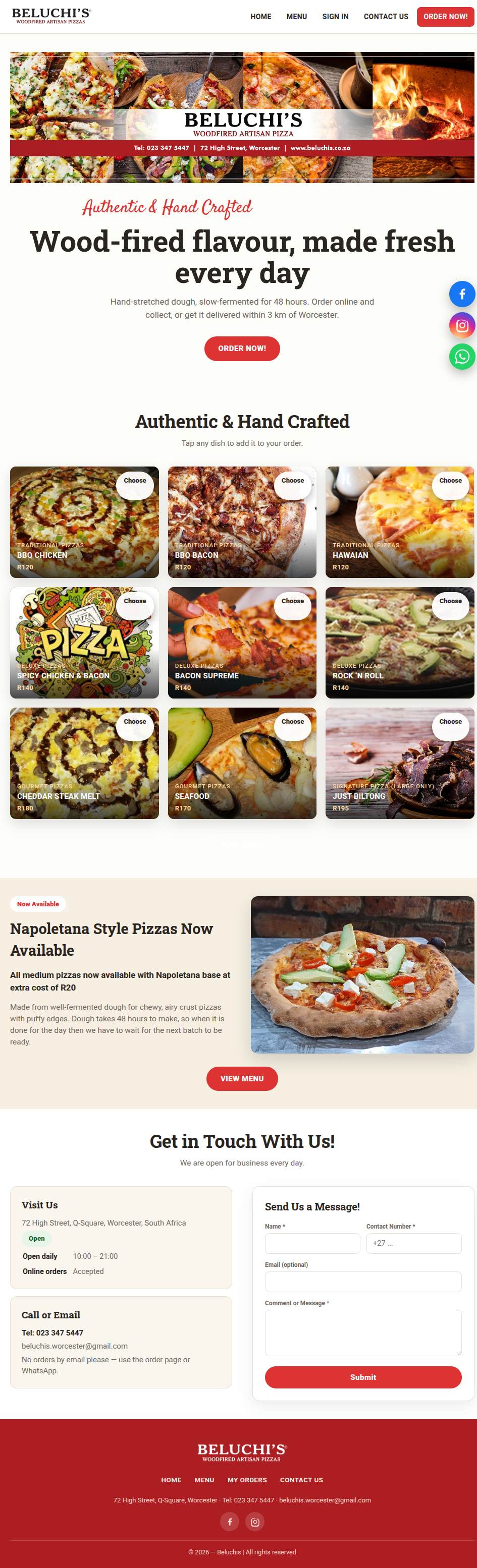
2. Home page
- Shop status pill — shows Open now / Closed — opens 10:00. When closed, checkout is paused but you can still browse and build your cart.
- Specials tiles & banners — current deals. Tap a dish to add it, or "View menu".
- Napoletana section — 48-hour fermented dough base info.
- Get in Touch card — address, phone, email, hours.
- Contact form — send a message. No orders by email — use the order page or WhatsApp.
Top bar: HOME, MENU, SIGN IN / MY ORDERS, CONTACT US, ORDER NOW!
3. Menu & ordering

Browsing
Dishes grouped by category with photo, name, description, sizes and prices. Tap the heart (♡) to save to favourites (login required).
Choosing a size
Tap a size button (e.g. Medium · R95) to add. Use +/− to set quantity first. Some dishes have a "Choose" button that opens a customiser.
Customising
Pick size, base (some free, some extra), extra toppings (price shown), seasonal swaps for out-of-season toppings, quantity, then Add to Order.
Deals
- BOGO — Pick N, pay N/2. Tap "Build your deal".
- Combo / fixed price — set of items for one price. Tap "Add to Order".
- Automatic deals — apply when the right items are in the cart.
- Pick deals — pick N pizzas, pay for N−1.
Cart
Tap "Cart" (top right) to open the drawer. Change quantities or remove lines. Floating bar at the bottom shows count and total.
4. Checkout
Three steps (accordion). Each must be completed before the next opens.
Step 1 — Your details
First name, last name, phone, optional email.
Step 2 — Delivery or collection
- Delivery: pick a saved location or add a new one. Drop a pin on the map (or "Use my current location").
- Free delivery within 3 km on orders from R200. R85 up to 10 km. R95 beyond 10 km. No address = collection.
- Add notes (e.g. "call on arrival").
Step 3 — Payment
- Optional coupon code.
- Pay by: cash on delivery, card on delivery, paid online now (if enabled), pay at counter (if enabled).
- Tap "Review order", check the summary, confirm.
After ordering you get an Order #. Track it in My Orders.
5. Your account
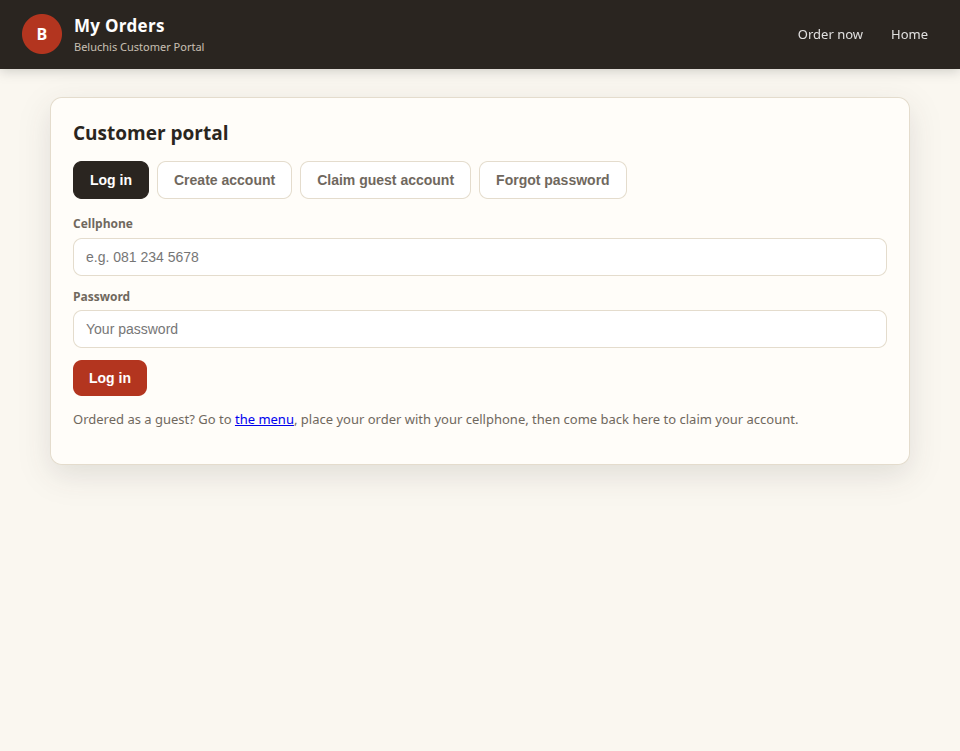
Logging in
- Enter cellphone + password → Log in.
- Claim guest account: enter the cellphone you ordered with, first name, choose password. Past orders link to your account.
- Forgot password: enter cellphone + first name, set new password.
- Create account: register with name, cellphone, optional email, password.
Dashboard
- My details — view/edit name, phone, email.
- Delivery locations — save up to 3 spots (name + map pin). Select one for delivery.
- Offers for you — personalised coupons. Tap Copy.
- Favourites — hearted dishes/deals. Tap Order or Remove.
- Order history — all orders with status, items, totals, progress timeline. Tap Reorder.
Status timeline
Placed → Preparing → Out for delivery → Delivered. Cancelled shows a red strip. "Awaiting payment" while payment confirms.
Notifications
Allow browser notifications for pop-ups when an order status changes (checked every 30s while portal is open).
6. Tips
- Closed? Browse and build your cart; checkout opens at 10:00.
- Delivery fee depends on distance and order amount — drop a pin for accuracy.
- Reorder is the quickest way to repeat an order.
- Favourites are saved to your account.
- No orders by email — use the website or WhatsApp.
7. Contact
- Visit: 72 High Street, Q-Square, Worcester
- Phone: 023 347 5447
- Email: beluchis.worcester@gmail.com
- Facebook: facebook.com/beluchisworcesterpizza
- WhatsApp: +27 71 461 7381
- Contact form on the Home page.
Beluchi's Pizzas — Authentic & Hand Crafted. © 2026
Inhoud
1. Welkom
Beluchi's Pizzas — eg & handgemaak. 72 High Street, Q-Square, Worcester. Telefoon 023 347 5447. Oop daagliks 10:00–21:00.
2. Tuisblad
- Winkelstatus (pil) — wys Nou oop / Gesluit — oop 10:00. Wanneer gesluit, is afrekening gepouseer maar jy kan steeds blaai en jou mandjie bou.
- Spesiale teëls & baniere — huidige aanbiedinge. Tik 'n gereg om by te voeg, of "Bekyk spyskaart".
- Napoletana-afdeling — 48-uur gegiste deegbasis inligting.
- Kontakkaart — adres, telefoon, e-pos, ure.
- Kontakvorm — stuur 'n boodskap. Geen bestellings per e-pos nie — gebruik die bestelblad of WhatsApp.
Bo-balk: HOME, MENU, SIGN IN / MY ORDERS, CONTACT US, ORDER NOW!
3. Spyskaart & bestel
Blaai
Geregte per kategorie met foto, naam, beskrywing, groottes en pryse. Tik die hartjie (♡) om as gunsteling te stoor (inteken nodig).
Kies 'n grootte
Tik 'n grootteknoppie (bv. Medium · R95) om by te voeg. Gebruik +/− om hoeveelheid te stel. Sommige geregte het 'n "Choose"-knoppie wat 'n aanpasser open.
Aanpassing
Kies grootte, basis (sommige gratis, sommige ekstra), ekstra toppings (prys gewys), seisoenale ruil vir buite-seisoen toppings, hoeveelheid, dan Add to Order.
Aanbiedinge
- BOGO — Kies N, betaal N/2. Tik "Build your deal".
- Kombo / vaste prys — stel items vir een prys. Tik "Add to Order".
- Outomatiese aanbiedinge — pas toe wanneer die regte items in die mandjie is.
- Kies-aanbiedinge — kies N pizzas, betaal vir N−1.
Mandjie
Tik "Cart" (regs bo) om die laai oop te maak. Verander hoeveelhede of verwyder lyne. Sweefbalk onder wys telling en totaal.
4. Afrekening
Drie stappe (akkordeon). Elke stap moet voltooi word voor die volgende oopmaak.
Stap 1 — Jou besonderhede
Voornaam, van, telefoon, opsionele e-pos.
Stap 2 — Aflewering of afhaal
- Aflewering: kies 'n gestoorde ligging of voeg 'n nuwe by. Laat 'n pen op die kaart val (of "Use my current location").
- Gratis aflewering binne 3 km op bestellings van R200. R85 tot 10 km. R95 verder as 10 km. Geen adres = afhaal.
- Voeg notas by (bv. "bel by aankoms").
Stap 3 — Betaling
- Opsionele koeponkode.
- Betaal met: kontant by aflewering, kaart by aflewering, nou aanlyn betaal (indien geaktiveer), betaal by toonbank (indien geaktiveer).
- Tik "Review order", kontroleer opsomming, bevestig.
Na bestel kry jy 'n Bestelling #. Spoort op in My Orders.
5. Jou rekening
Inteken
- Voer selfoon + wagwoord in → Log in.
- Claim guest account: voer selfoon waarmee bestel, voornaam, kies wagwoord. Vorige bestellings koppel aan rekening.
- Forgot password: voer selfoon + voornaam in, stel nuwe wagwoord.
- Create account: registreer met naam, selfoon, opsionele e-pos, wagwoord.
Dashboard
- My details — bekyk/wysig naam, telefoon, e-pos.
- Delivery locations — stoor tot 3 plekke (naam + kaartpen). Kies een vir aflewering.
- Offers for you — persoonlike koepons. Tik Copy.
- Favourites — hartjie-geregte/aanbiedinge. Tik Order of Remove.
- Order history — alle bestellings met status, items, totale, vorderings-tydlyn. Tik Reorder.
Status-tydlyn
Placed → Preparing → Out for delivery → Delivered. Gekanselleer wys rooi strook. "Awaiting payment" terwyl betaling bevestig.
Kennisgewings
Laat blaaier-kennisgewings toe vir opspringers wanneer 'n bestellingstatus verander (elke 30s terwyl portaal oop is).
6. Wenke
- Gesluit? Blaai en bou jou mandjie; afrekening open om 10:00.
- Afleweringsfooi hang af van afstand en bestelbedrag — laat 'n pen val vir akkuraatheid.
- Reorder is die vinnigste manier om 'n bestelling te herhaal.
- Gunstelinge word op jou rekening gestoor.
- Geen bestellings per e-pos nie — gebruik die webwerf of WhatsApp.
7. Kontak
- Besoek: 72 High Street, Q-Square, Worcester
- Telefoon: 023 347 5447
- E-pos: beluchis.worcester@gmail.com
- Facebook: facebook.com/beluchisworcesterpizza
- WhatsApp: +27 71 461 7381
- Kontakvorm op die Tuisblad.
Beluchi's Pizzas — Authentic & Hand Crafted. © 2026